Google Business Profile Optimization: The Complete 2026 Guide (That Actually Works)
Last updated: May 2026 · 15 min read
Let’s be honest.
Google Business Profile Optimization-Most advice about Google Business Profile optimization sounds like it was written by someone who’s never actually run a local business. Vague tips. Generic checklists. The same recycled bullet points you’ve read ten times already.
This guide is different.
Whether you run a restaurant, a dental clinic, a law firm, or a repair shop — this is the real, step-by-step breakdown of how Google Business Profile works, why it matters more than your website for local searches, and exactly what you need to do to climb into that coveted Map Pack.
No fluff. No jargon soup. Just what works. “Google Business Profile Optimization”
First, Let’s Get This Straight — What Even Is Google Business Profile?
You might still call it Google My Business (GMB). That’s fine — most people do. But Google rebranded it to Google Business Profile back in 2021. Same platform, new name.
It’s the free listing that shows up when someone Googles your business name, or searches for services near them — like “dentist near me” or “best biryani in Lajpat Nagar.”
That box on the right side of Google? That’s your GBP. The three map results that appear before anything else on the page? That’s called the Map Pack — and getting into it is the whole game.
Here’s a stat that should make you sit up straight: 46% of all Google searches have local intent. That means nearly half of everyone searching on Google is looking for something nearby. And 50% of those people click a Map Pack result before they even scroll down to the websites.
Your Google Business Profile is often the first impression you make. Not your website. Not your Instagram. Your GBP.
If it’s incomplete, outdated, or just sitting there with the default info Google scraped about you — you’re losing customers every single day.
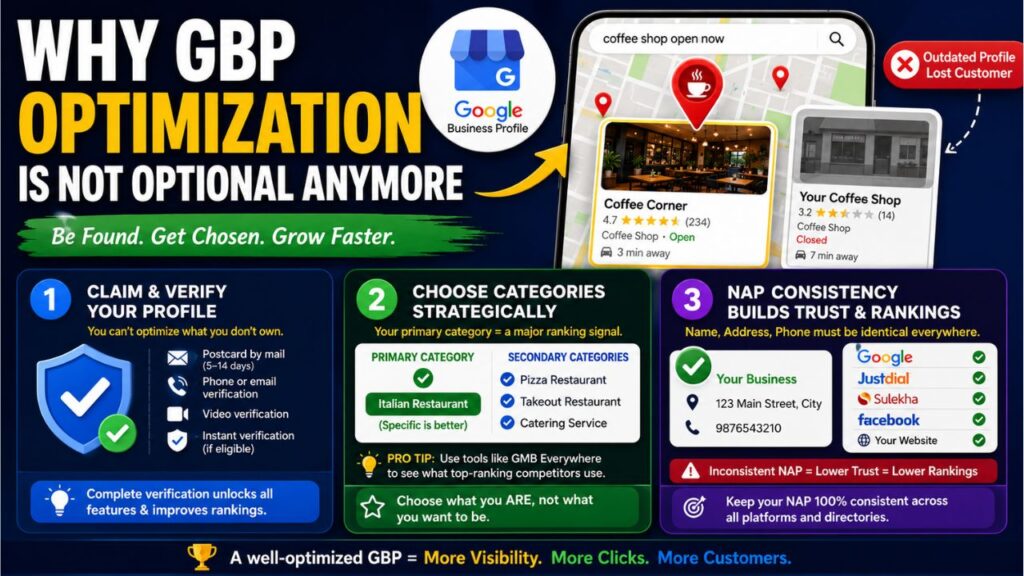
Why GBP Optimization Is Not Optional Anymore
Here’s a scenario that plays out constantly:
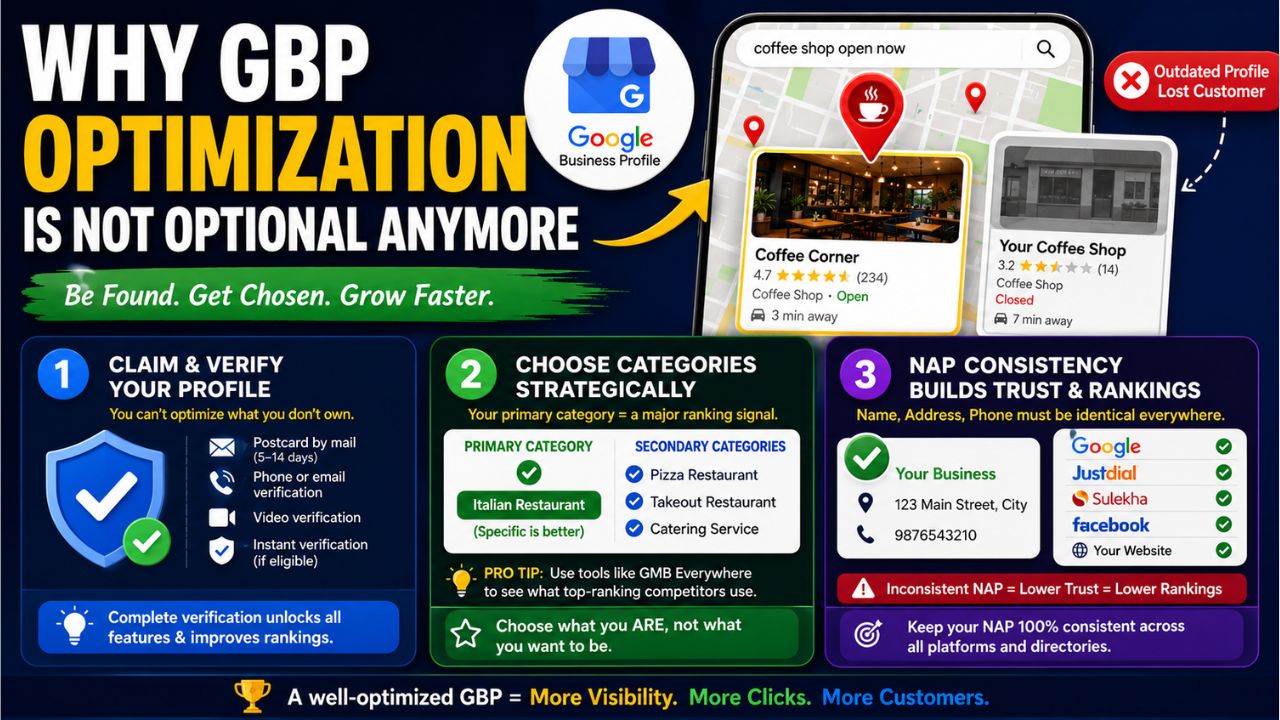
A potential customer is driving through your area. They search for “coffee shop open now.” Three results appear on the map. They tap the first one with 4.7 stars and 200+ reviews, check the hours, see great photos of the seating area — and they’re heading there in three minutes.
Your shop is two blocks closer. But your GBP hasn’t been touched in two years. No photos. Fourteen reviews. Hours not updated.
You just lost that customer without them ever knowing you existed.
Honestly GBP optimization levels the playing field
A well-optimized profile from a small local business can and does outrank national chains with massive advertising budgets — because Google’s local algorithm rewards relevance and completeness, not just money.
How Google Decides Who Shows Up in the Map Pack
Before we get into the how-to, you need to understand the why behind what Google rewards.
Google prioritizes its local search results depending on the following three things:
1. Relevance: Is your profile relevant to what someone was looking for?
2. Distance — How far away are you from the searcher or the search location?
3. Prominence —How prominent and trusted your business is online?
Every optimization tip in this guide ties back to one of these three signals. Keep this triangle in your head as you work through the steps.
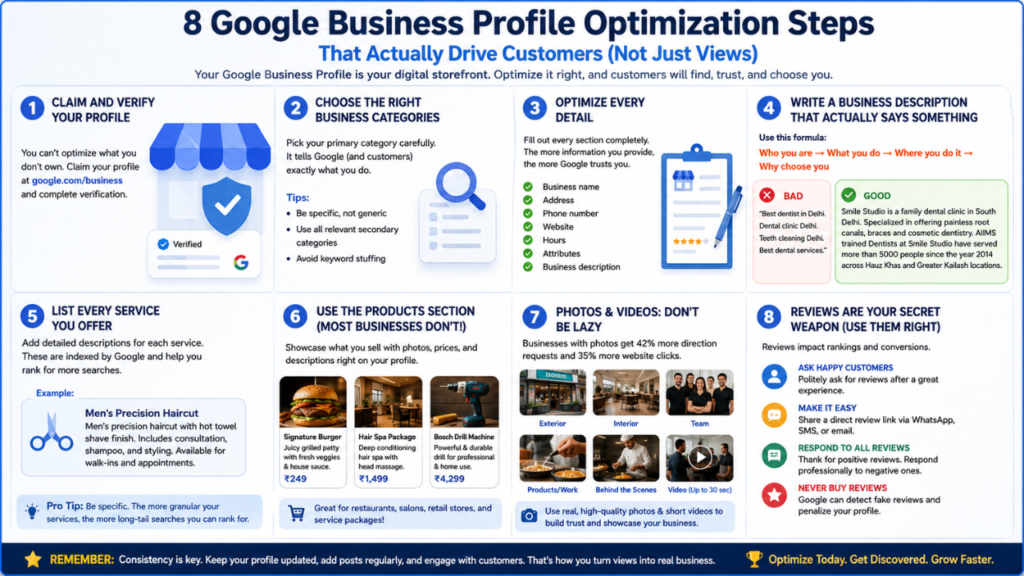
Step 1 — Claim and Verify Your Profile (Don’t Skip This)
Before you can optimize anything, you need to own your listing.
Go to business.google.com and search for your business. If it already exists (Google auto-creates listings), claim it. If not, create it from scratch.
Verification is where many people get stuck. Google needs to confirm you actually own the business. Methods include:
- Postcard by mail — Google sends a code to your business address (takes 5–14 days)
- Phone or email verification — Available for some businesses instantly
- Video verification — Increasingly common; you record a short walkthrough of your business
- Instant verification — Available if your Google Search Console is already verified for the same domain
Don’t rush this step. An unverified listing has severely limited functionality and won’t rank well.
Step 2 — Choose Your Categories Like Your Rankings Depend On It (Because They Do)
Your primary category is one of the most powerful ranking signals in your entire profile. Get it wrong and you’ll struggle to rank no matter how much else you optimize.
You get one primary category and up to nine secondary categories. Here’s the rule: choose what you are, not what you want to be associated with.
If you run an Italian restaurant, your primary category is “Italian Restaurant” — not just “Restaurant.” The more specific, the better.
Some examples:
- A general physician → “General Practitioner” not just “Doctor”
- A car repair shop that focuses on brakes → “Brake Shop” as primary, “Auto Repair Shop” as secondary
- A bakery that also does custom cakes → “Bakery” as primary, “Custom Cake Shop” as secondary
Pro tip: Use a free tool like GMB Everywhere to peek at what categories your top-ranking competitors are using. This takes the guesswork out completely.
Don’t stuff categories just to appear in more searches. Google is smart enough to penalize over-categorization, and it dilutes your relevance for your core category.
Step 3 — Your Business Name, Address, and Phone Must Be Exactly Consistent
This one sounds boring. It isn’t.
NAP consistency — Name, Address, Phone — is the backbone of local SEO trust. If your business name is listed as “Sharma Electronics” on GBP but “Sharma Electronics & Appliances” on Justdial, and “Sharma Elec.” on IndiaMART — Google sees these as potentially different businesses.
That inconsistency chips away at your credibility and hurts your rankings.
Go through every directory and listing where your business appears — Google, Justdial, Sulekha, Facebook, your website’s contact page, etc. — and make sure the name, address, and phone number are identical everywhere.
On the address side: Google requires a real, physical, staffed address. No P.O. Boxes. If you work from home and don’t want your home address public, you can set your listing as a service-area business and hide the address — but you’ll sacrifice some proximity ranking in return.
Google Business Profile Optimization:
Step 4 — Write a Business Description That Actually Says Something
You get 750 characters. Most businesses use about 80 of them to write something like “We provide quality services at affordable prices.”
That’s a waste of one of your best keyword opportunities.
Here’s the formula for a description that works:
Who you are → What you do specifically → Where you do it → Why choose you
Don’t keyword-stuff. Write like a human. Google’s algorithm is trained to recognize natural language, and a description packed with repetitive keywords reads poorly to real customers too.
Here’s the difference between a weak and good profile description:
- Bad
“Best dentist in Delhi. Dental clinic Delhi. Teeth cleaning Delhi. Best dental services.”
- Good
Smile Studio is a family dental clinic in South Delhi. Specialized in offering painless root canals, braces and cosmetic dentistry. AIIMS trained Dentists at Smile Studio have served more than 5000 people since the year 2014 across Hauz Khas and Greater Kailash locations.
See the difference? The second version includes location, specific services, a trust signal (AIIMS-trained), social proof (5,000 patients), and a practical differentiator (Sunday hours and emergency slots). That’s a description that converts.
Step 5 — List Every Service You Offer (With Actual Descriptions)
The Services section is criminally underused. Most businesses add two or three vague service names and call it done.
Here’s what you should do instead:
For each service, add a name and a description. These descriptions are indexed by Google — meaning they’re searchable. This is a massive, often-overlooked keyword opportunity.
Instead of just listing “Hair Cut,” write:
“Men’s precision haircut with hot towel shave finish. Includes consultation, shampoo, and styling. Available for walk-ins and appointments.”
That description could rank for searches like “men’s haircut with shave near me” — searches your competitors aren’t optimized for because they didn’t bother to write the description.
Cover every service variation you offer. The more granular, the more long-tail searches you can capture.
Step 6 — Use the Products Section (Most Businesses Don’t Even Know It Exists)
This is one of the biggest missed opportunities on GBP.
If you sell physical products — or even specific service packages — you can list them in the Products section with a photo, price, and description.
The They will appear prominently on your profile and may help a customer make a decision even before picking up the phone.
Think of it as a storefront inside Google.
Restaurant Example: Provide descriptions of signature items along with pictures and prices.
Salon Example: Offer information about service packages and their price. Hardware Shop
Example: Provide a list of available products you have in your store.
This will also help Google better understand what services you offer.
Step 7 — Photos and Videos: This Is Not the Place to Be Lazy
Did you know? Businesses with pictures attract 42% more map directions requests and 35% more website clicks than businesses without.
Photos build trust before a single word is read.
What to upload:
- Exterior shot (so people recognize the place when they arrive)
- Interior shots showing the vibe and cleanliness
- Team photos (human faces build trust faster than anything)
- Products, food, or work examples
- Behind-the-scenes moment
Things Not Post:
- Blurry phone photos taken in bad lighting
- Stock photos (Google’s algorithm can detect them and they erode trust)
- Unrelated images
The video opportunity nobody is using: GBP allows you to upload videos up to 30 seconds long. Very few businesses do this. A short, genuine video tour of your shop, a 20-second “how we make our best-selling dish,” or a quick intro from the owner creates an instant human connection that photos can’t replicate.
Bonus for the SEO-minded: When naming your image files before uploading, use descriptive names like south-delhi-dental-clinic-interior.jpg instead of IMG_4823.jpg. It’s a small signal but adds up.
Step 8 — Reviews Are Your Secret Weapon (And Most People Use Them Wrong)
Reviews affect rankings. Reviews affect conversions. Reviews are probably the single most powerful tool you have — and most businesses treat them like a passive thing that either happens or doesn’t.
Getting more reviews:
The most effective method is embarrassingly simple: just ask. After a positive interaction, say “If you have a minute, an honest Google review would really help us out.” Send a follow-up WhatsApp or email with a direct link.
You can get your review link from your GBP dashboard. Put it in your email signature. Print a QR code and stick it on your counter.
The keyword trick in reviews:
Here’s something most guides won’t tell you: the words inside your reviews affect what searches you rank for.
If a customer writes “best biryani in Malviya Nagar, I found this place through Google and it exceeded my expectations” — Google sees those keywords and they help you rank for “best biryani in Malviya Nagar.”
You can’t write reviews for yourself (obviously). But you can gently guide customers when asking. Something like: “If you could mention what service you used and where you found us, that really helps other people know what to expect.”
Responding to reviews — do it with purpose:
Google Business Profile Optimization: When you respond, don’t just say “Thanks for your review!” Use the response to naturally include a service and location keyword.
“We really appreciate your choosing Smile Studio for your implant. We are delighted to know that you found your experience here comfortable. See you at your next appointment.”
The above message goes live, triggers certain search terms on Google and proves to be a proactive and engaged business.
One more thing: Respond to negative reviews too. Calmly. Professionally. A composed, helpful response to a 1-star review often impresses potential customers more than a page full of 5-star reviews ever could.
Step 9 — The Q&A Section Is a Hidden Gold Mine
Google Business Profile Optimization: Almost nobody uses this feature strategically. That’s your advantage.
The Q&A section on your GBP allows anyone to ask questions — and anyone (including you) to answer them. Here’s the thing: if you don’t answer them, random strangers will. And those answers might be wrong, unhelpful, or even damaging.
The smart move: Pre-populate your own Q&A section with common questions customers ask.
Think about what people actually want to know before they visit:
- “Do you offer home delivery?”
- “Is there parking available?”
- “Do you accept credit cards?”
- “What are your charges for a consultation?”
- “Do I need an appointment or can I walk in?”
Write the questions yourself, then answer them thoroughly. Use natural keywords in your answers. This content is indexed by Google — so a good Q&A section actually helps you rank for question-based searches.
It also reduces the calls you get asking the same things over and over. Win-win.
Step 10 — Enable Messaging (And Actually Respond)
GBP has a built-in messaging feature that lets customers message you directly from your profile on Google Search and Maps.
Enable it. This is low-hanging fruit.
A customer who can message you instantly is far more likely to convert than one who has to call during business hours. Especially younger customers who prefer texting over calling.
The one non-negotiable: respond quickly. Google tracks your response rate and response time, and displays them publicly. If you consistently take days to respond, it can actually hurt your profile’s visibility.
Set up notifications so you get an instant alert whenever a message comes in. If you can’t manage it personally, assign it to someone on your team.
Step 11 — Google Posts: Your Free Billboard That Most Businesses Ignore
Think of Google Posts as a micro-blog that lives directly on your GBP. You can publish updates, offers, events, and news — and they show up right on your business listing.
They don’t have a massive direct impact on rankings, but they do two important things:
- They show Google that your profile is actively maintained, which matters.
- They give customers a reason to engage when they’re already looking at your profile.
What to post:
- “Now offering Sunday appointments” (service update)
- “This week only — 20% off all cleanings” (offer)
- “Join us at the South Delhi Food Festival this Saturday” (event)
- “How to care for your teeth after braces — new blog post” (content)
Once a month is the bare minimum. Once a week is ideal. Keep posts short, specific, and action-driven.
Step 12 — Track Your Performance and Actually Act On It
GBP gives you access to built-in analytics called Performance (formerly Insights). Most business owners never look at it.
Check these metrics monthly:
- How customers find you —Direct searches (your business name) vs. Discovery searches (category or keyword searches). You want to grow your discovery numbers.
- What they do next — Calls, direction requests, website clicks. If there is a scenario where the phone calls are few but impressions many, then it could be due to lack of proper phone listing or clear business hours.
- Photo views – What photos are generating the highest amount of views? Upload more similar photos.
Google Search Console is another way to get into depth analysis to determine which search terms are helping to generate traffic via location-based searches to your website.
Bright Local and Moz Local are two great tools to help you keep track of your rankings and that of your competitors.
Common Mistakes That Are Killing Your GBP Rankings
Here are the things local businesses get wrong most often: Google Business Profile Optimization
Inconsistent business hours:- If your GBP says you close at 9 PM but you actually close at 8 PM, customers will show up to a locked door, leave angry reviews, and never come back. Update your hours for holidays too — there’s a “Special Hours” feature specifically for this.
Ignoring the “Suggest an Edit” feature:- Competitors (or just confused people) can suggest changes to your listing. If Google approves incorrect edits, it can seriously damage your profile. Check your GBP regularly for any suggested changes waiting for your approval.
Using a P.O. Box or virtual office address:- Google will eventually suspend your listing if it discovers you’re not actually present at the address you’ve listed. Use a real location where staff are present during business hours.
Letting your profile go cold:- GBP is not set-it-and-forget-it. Old listings with no recent activity, no new photos, no recent reviews, and no posts signal to Google that the business may be closed or neglected.
Never responding to reviews:- Every unanswered review is a missed opportunity — both to add keyword-rich content and to show future customers that you care.
What To Do If Your GBP Gets Suspended
This happens more than people realize, and it can feel catastrophic when it does. Your listing simply disappears from Google.
Common reasons for suspension:
- Resolve problems (P. O. box, virtual office, or an address does not match the verified one.
- Company Name including any marketing terms (“Best Dentist in Delhi” cannot be used as a business name)
- Listings for the very same location appearing more than once
- Abrupt activity on editing the profile
How to get back on track:
You may visit the GBP Help page to file for a reinstatement request. You will have to show your business credentials in terms of utilities bills, lease deeds, etc. It can take 1–3 weeks.
Prevention is better than cure: follow Google’s guidelines strictly, especially on business names and addresses.
The Complete GBP Optimization Checklist:-
Save this. Use it.
Profile Basics :-
- Business claimed and verified
- Business name exactly matches real-world signage (no extra keywords)
- Primary category is as specific as possible
- Up to 9 relevant secondary categories added
- NAP consistent across all directories and your website
Description & Services
- 750-character description written with who/what/where/why formula
- All services listed with detailed descriptions
- Products section populated (if applicable)
Visual Content
- Exterior photo uploaded
- Interior photos uploaded (minimum 3–5)
- Team/people photos added
- Product or work examples shown
- At least one video uploaded (30 seconds)
Reviews & Engagement
- Review generation process in place (link shared actively)
- Responding to every review (positive and negative)
- Q&A section pre-populated with 5–10 common questions
- Messaging feature enabled and monitored
Ongoing Activity
- Google Posts published at least monthly
- Special hours set for holidays
- Profile checked monthly for unauthorized edits
- GBP Performance metrics reviewed monthly
- Photos added regularly (at least monthly)
Google Business Profile Optimization
Frequently Asked Questions
Typically 4–8 weeks for meaningful movement, though some businesses see improvement within days of completing a full optimization. google my business SEO is not instant, but it’s compounding — results build over time.
Very difficult if you have a service-area business and no physical address there. Google heavily prioritizes proximity. If ranking in multiple cities is critical, consider whether establishing a physical presence in those areas makes sense for your business.
Yes. Completely free. Google charges for ads (like Local Services Ads and Google Ads), but the organic GBP listing itself costs nothing. Optimizing it is essentially free marketing.
This is a real problem called “GBP spam.” You can report it using Google’s Business Redressal Complaint Form. Google doesn’t always act quickly, but reporting Do I need a website to have a GBP? consistently does lead to enforcement over time.
NO. You can even get your own free website from GBP. But still having a website and linking it to Google Business Profile Optimization enhances your web visibility immensely.
Final Word: Local Search Is Where Real Customers Are
Google Business Profile Optimization: Your website might be beautiful. Your social media might be consistent. But for most local businesses, Google Business Profile is where the actual decision happens.
It’s where someone sees your hours, reads your reviews, looks at your photos, and decides — in about 30 seconds — whether they’re coming to you or going to your competitor.
The good news? Most of your competitors are doing a mediocre job with their GBP. They haven’t filled in the services section. They haven’t touched the Q&A. They haven’t posted in months. They’re responding to reviews with one-liners.
That’s your opportunity.
Start with the checklist above. Work through it section by section. You don’t have to do everything in one day — but start today.
Because while you’re reading this, someone in your city just searched for exactly what you offer.
The question is: are you the one they found?
Have questions about optimizing your Google Business Profile? Drop them in the comments below and we’ll answer every single one.