
How to Write ChatGPT Prompts That Actually Get You Something Useful
How to Write ChatGPT Prompts That Actually Work (2026 Guide)-Most people are doing this completely wrong — here’s what changed everything for me
Okay, real talk.
When I first started using ChatGPT, I thought it was kind of… bad? Like genuinely underwhelming. I’d type something in, get back this perfectly structured wall of text that said absolutely nothing, and think — what’s all the hype about?
Turns out I was the problem.
Not the tool. Me. The way I was using it was like hiring a brilliant researcher and then handing them a sticky note that said “do research.” Of course the output was useless. I gave them nothing to work with.
The moment I figured out how to actually write a proper prompt? Everything changed. And I mean that — the difference between a bad prompt and a good one is not small. It’s the difference between “that’s garbage” and “wait, I can actually use this.”
So let me show you what I know.
How to Write ChatGPT Prompts That Actually Work (2026 Guide)
Why Your ChatGPT Outputs Are Probably Bad
There’s a really simple reason most people get disappointing results from ChatGPT.
They treat it like a search engine.
You type in a few words. You expect it to read your mind. It doesn’t. It guesses. And when it guesses with no information to work from, it picks the most generic, inoffensive, middle-of-the-road answer it can find.
That’s not a bug. That’s literally what it’s designed to do when the input is vague.
Think about it this way. If I walked up to a stranger and said “write me something about marketing,” what would they do? Stare at me. Ask a thousand follow-up questions. Or — if they’re polite — hand me something so broad it could apply to any company on earth.
ChatGPT can’t stare at you blankly. So it just… writes something. Anything. And “anything” is rarely what you needed.
The fix is learning to give it a proper brief. That’s the whole skill. There’s no mystery beyond that.
The 5 Things Every Decent Prompt Needs
I’ve tried a lot of different frameworks. Some are complicated. Some are so simple they don’t actually help. This one hits the right balance — five things, in order, takes about two minutes to build.
I call it RCTSE. Role, Context, Task, Specifications, Examples.
Work through each one. That’s the entire system.
Role: Tell It Who It’s Being
This is the first thing most people skip, and it makes a bigger difference than you’d think.
When you assign ChatGPT a role — a real, specific identity — you change the entire frame it uses to respond. The vocabulary shifts. The assumptions shift. The level of depth changes.
No role: “Help me negotiate a raise.”
With a role: “Act as a career coach who’s helped hundreds of people negotiate salaries. Give me a step-by-step approach for asking for a 20% raise after 18 months without one.”
Those are not the same prompt. The first one gets you five generic bullet points. The second gets you something that actually sounds like advice from someone who knows what they’re talking about.
Here’s a quick list of roles worth keeping in your back pocket:
For writing: “Act as a direct-response copywriter with 10 years of experience writing for e-commerce brands.”
For simplifying complex stuff: “Act as a teacher explaining this to a curious 16-year-old — no jargon, real examples.”
For pushing back on your ideas: “Act as a skeptical investor who’s heard a thousand pitches. Tear apart my business idea.”
For technical work: “Act as a senior software engineer reviewing code for readability and efficiency.”
For marketing: “Act as a brand strategist who’s worked with both scrappy startups and Fortune 500 companies.”
One sentence. Massive shift in what comes back.
Context: Give It the Backstory
Okay so this is probably the most underused part of prompting, and I think it’s because people feel like they’re over-explaining.
You’re not. You’re briefing a collaborator.
ChatGPT knows nothing about your business, your audience, your goals, your brand voice, your competitors, or your situation. Unless you tell it. And if you don’t tell it, it invents a situation — and that invented situation is almost never yours.
What does good context look like?
Bad: “Write a welcome email for new subscribers.”
Good: “I run a newsletter about personal finance for people in their late 20s and early 30s who feel behind on money stuff — behind on savings, not sure about investing, a bit overwhelmed. The newsletter is called ‘Catch Up.’ It’s conversational and honest, not preachy. A new subscriber just joined. I want to welcome them in a way that makes them feel like they found something that actually gets it.”
The second version tells ChatGPT who the reader is, what they’re feeling, what the brand sounds like, and what success looks like emotionally. Now it can actually write something that fits.
Context should answer:
- Who is this for? Not just “adults” — real specifics about them.
- What do they already know or believe?
- What’s the situation or moment this piece sits in?
- What does the reader need to feel when they read this?
Forty extra seconds of context saves you four rounds of editing. Do it.
Task: Be Annoyingly Specific About What You Want
Here’s a test. Read your task description out loud. If it could describe 50 different pieces of content, it’s too vague.
“Write a blog post about nutrition” describes 50 different blog posts. “Write an 800-word blog post for busy parents who want practical, low-effort ways to get more vegetables into their kids’ meals — start with a relatable problem, give 5 specific tactics, end with a simple challenge for this week” describes one.
Always start your task with a strong action verb:
- Write — for creating new content
- Rewrite — for improving something existing
- Summarize — for distilling long content
- Generate — for producing options or lists
- Analyze — for breaking something down
- Create — for building frameworks, plans, structures
And then be specific about format, length, structure, and intended destination. Where is this going to live? A newsletter? A sales page? A LinkedIn post? An internal Slack message? That changes everything about how it should be written.
Specifications: Set the Ground Rules
Specs are your guardrails. They tell ChatGPT what it absolutely should — and shouldn’t — do.
This is also where you head off all the annoying habits it has by default. The corporate buzzwords. The perfectly symmetrical structure. The cautious hedging. The “I hope this helps!” sign-off. All of that goes away when you specify against it.
For tone:
- “Write like a real person, not a content agency — conversational, a bit direct, occasionally a little blunt”
- “Warm but not gushing. Helpful but not preachy.”
- “Think: trusted friend who happens to be an expert, not consultant presenting to a board.”
For format:
- “Short paragraphs — max 3 sentences each”
- “No bullet points. Prose only.”
- “Include headers for each section. Bold the key insight in each one.”
- “Write in first person”
For avoiding the obvious bad stuff:
- “Do not use the words: leverage, synergy, holistic, streamline, or game-changer”
- “Don’t start with a rhetorical question”
- “Avoid the phrase ‘In today’s world’ or ‘In today’s fast-paced environment'”
- “No inspirational closing line about unlocking potential or achieving goals”
- “Don’t add a disclaimer at the end”
The more specific your rules, the less you’ll want to throw your laptop out the window after reading the output.
How to Write ChatGPT Prompts That Actually Work (2026 Guide)
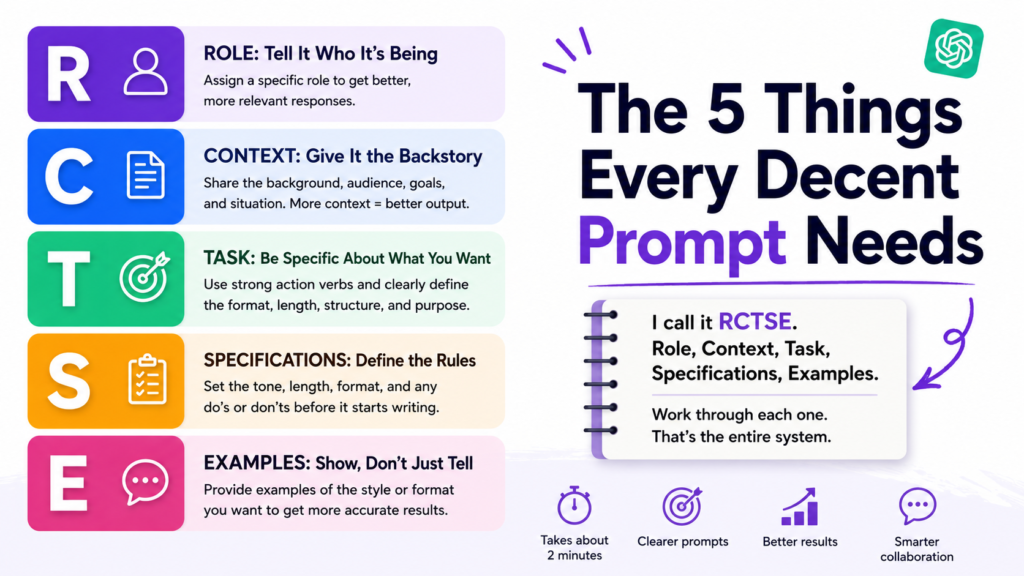
Examples: Show It Exactly What You Mean
This is the single highest-leverage thing you can add to any prompt. And almost nobody does it.
When you paste in an example — even a rough one — ChatGPT reverse-engineers the style and matches it. The rhythm. The vocabulary level. The sentence structure. The vibe. It reads it and calibrates.
You don’t need a perfect example. You need a real one.
A subject line you once wrote that worked. A paragraph from a piece you were proud of. A competitor’s post you genuinely thought was well-written. Even a description of a piece you liked.
Without example:
“Write subject lines for our Black Friday email. Make them feel exciting but not spammy.”
With example:
“Write 5 subject lines for our Black Friday email. Here’s the tone I’m after — we’ve used things like ‘This is the one we’ve been holding back’ and ‘Forty-eight hours. That’s all.’ Intriguing, short, no exclamation marks, no percentages or dollar amounts in the subject line itself.”
Night and day. Genuinely.
Putting It All Together: A Full Prompt in the Wild
Here’s a real example — all five parts, built into a single prompt:
You’re a content writer who specializes in writing for wellness and lifestyle brands that have a calm, considered aesthetic — think Aesop or Kinfolk magazine.
I run a small, premium sleep brand. We sell linen bedding and non-toxic mattresses to people who take their sleep environment seriously. Our customers are mostly couples in their mid-30s to mid-40s, design-conscious, health-aware, tired of fast fashion and disposable products. They don’t respond to hype or urgency tactics.
Write a homepage headline and three supporting subheadings for our website redesign.
Tone: quiet, confident, warm. Not minimalist to the point of being cold — there should be a human warmth in there. No exclamation marks. No sleep puns (“rest easy,” “dream big,” etc.). Max 10 words per headline. Subheadings max 20 words.
The kind of language I’m after — here’s a tagline we’ve used before that felt right: “Made for the hours that restore you.”
That’s a real prompt. Not a quick thing you dash off. A brief. And the output from that will be miles ahead of “write homepage copy for my sleep brand.”
How to Write ChatGPT Prompts That Actually Work (2026 Guide)
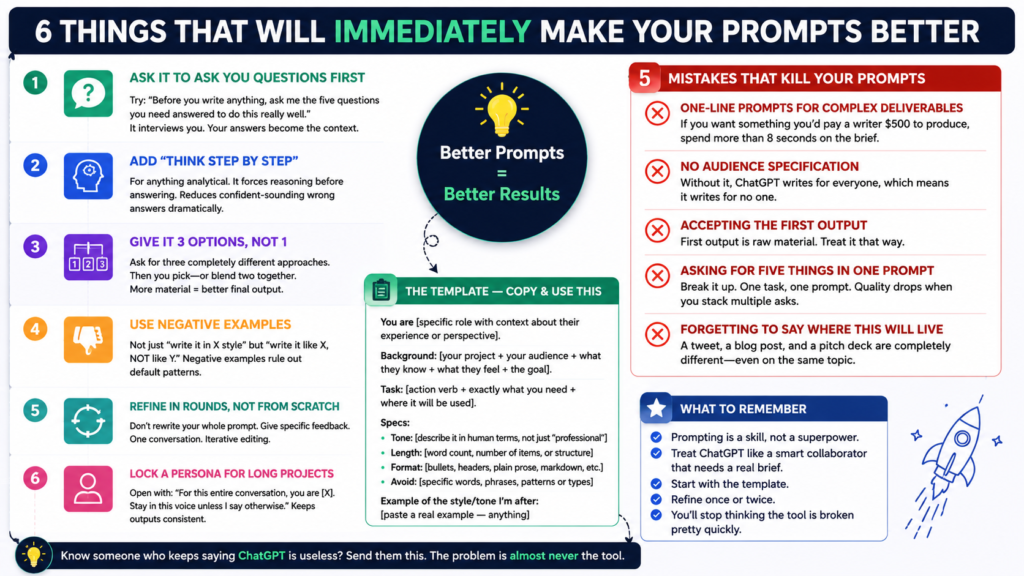
Six Things That Will Immediately Make Your Prompts Better
Quick additions. Worth knowing.
Ask it to ask you questions first. Try: “Before you write anything, ask me the five questions you need answered to do this really well.” It interviews you. Your answers become the context. Often faster than building the prompt yourself.
Add “think step by step” for anything analytical. If you need analysis, strategy, or problem-solving, add that phrase before the task. It forces reasoning before answering. Reduces confident-sounding wrong answers dramatically.
Give it 3 options, not 1. Instead of asking for the best version, ask for three completely different approaches. Then you pick — or blend two together. More material = better final output.
Use negative examples. Not just “write it in X style” but “write it like X, NOT like Y.” Negative examples are surprisingly powerful at ruling out default patterns.
Refine in rounds, not from scratch. After the first output, don’t rewrite your whole prompt. Just respond with specific feedback. “Too formal — make it more casual.” “Cut the third paragraph, it’s redundant.” “The ending is weak, rewrite it with more confidence.” One conversation. Iterative editing.
Lock a persona for long projects. If you’re working on something across multiple prompts, open with: “For this entire conversation, you are [X]. Stay in this voice unless I say otherwise.” Keeps outputs consistent without re-briefing every time.
Five Mistakes That Kill Your Prompts
These are so common. You’re probably doing at least two of them.
One-line prompts for complex deliverables. If you want something you’d pay a writer $500 to produce, spend more than 8 seconds on the brief.
No audience specification. “A LinkedIn post” for who? What industry? What seniority level? What do they already believe about this topic? Without that, ChatGPT writes for everyone, which means it writes for no one.
Accepting the first output. I don’t know a single good writer who publishes first drafts. The first output is raw material. Treat it that way.
Asking for five things in one prompt. Break it up. One task, one prompt. When you stack multiple asks, the quality of each one drops.
Forgetting to say where this will live. A tweet, a blog post, and a pitch deck are completely different things — even if they’re covering the same topic. Specify the destination.
The Template — Copy and Use This
How to Write ChatGPT Prompts That Actually Work (2026 Guide) :Seriously, save this somewhere you’ll actually find it:
You are [specific role with context about their experience or perspective].

Background: [your project + your audience + what they know + what they feel + the goal].

Task: [action verb + exactly what you need + where it will be used].

Specs:
- Tone: [describe it in human terms, not just "professional"]
- Length: [word count, number of items, or structural description]
- Format: [bullets, headers, plain prose, markdown, etc.]
- Avoid: [specific words, phrases, patterns, or types of content]

Example of the style/tone I'm after: [paste a real example — anything]
Fill every blank. Hit send. Refine once or twice. Done.
Here’s What I’ll Leave You With
Prompting isn’t a superpower. It’s a skill. A pretty learnable one.
The people getting great results from ChatGPT aren’t using special access or secret techniques. They’re just treating it like a smart collaborator who needs a real brief — not a machine you shake until something useful falls out.
Start with the template. Build one good prompt today. See what comes back when you actually give the model something to work with.
You’ll stop thinking the tool is broken pretty quickly. How to Write ChatGPT Prompts That Actually Work (2026 Guide)
Know someone who keeps saying ChatGPT is useless? Send them this. The problem is almost never the tool.