SEO Complete Guide for Beginners (2026): Everything You Actually Need to Rank on Google
SEO Complete Guide for Beginners Last Updated: June 2026 | Reading Time: ~18 minutes | By Saksham Verma
I’ll be honest with you about how this guide came to exist.
When I first started learning SEO, I read at least a dozen “complete guides,” and walked away from every single one with no real idea what to do on Monday morning. They were stuffed with jargon, abstract theory, and screenshots from tools I couldn’t afford yet.
So I wrote the guide I wish someone had handed me. It’s for the person who already has a website (or is about to start one), wants actual Google traffic, and doesn’t have months to spend figuring out what matters and what’s noise.
By the end, you’ll know what SEO actually is, how it works in 2026, and — more importantly — what to go do today instead of someday.
Table of Contents
- What is SEO, Really?
- How Google Actually Decides Who Ranks
- The 3 Types of SEO (and Which One to Focus on First)
- Keyword Research: How to Find What People Are Searching
- On-Page SEO: What to Do Inside Your Articles
- Technical SEO: The Foundation Nobody Talks About
- Off-Page SEO: How to Build Authority
- How to Rank in Google AI Overviews (2026)
- How to Track Whether Your SEO Is Working
- Common SEO Mistakes Beginners Make
- Your 30-Day SEO Action Plan
- FAQ
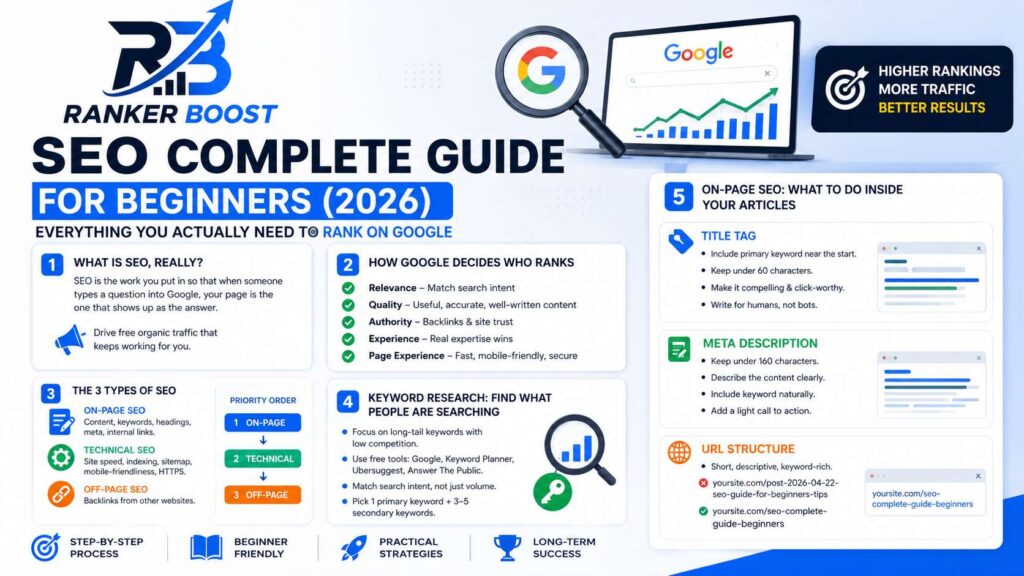
1. What is SEO, Really?
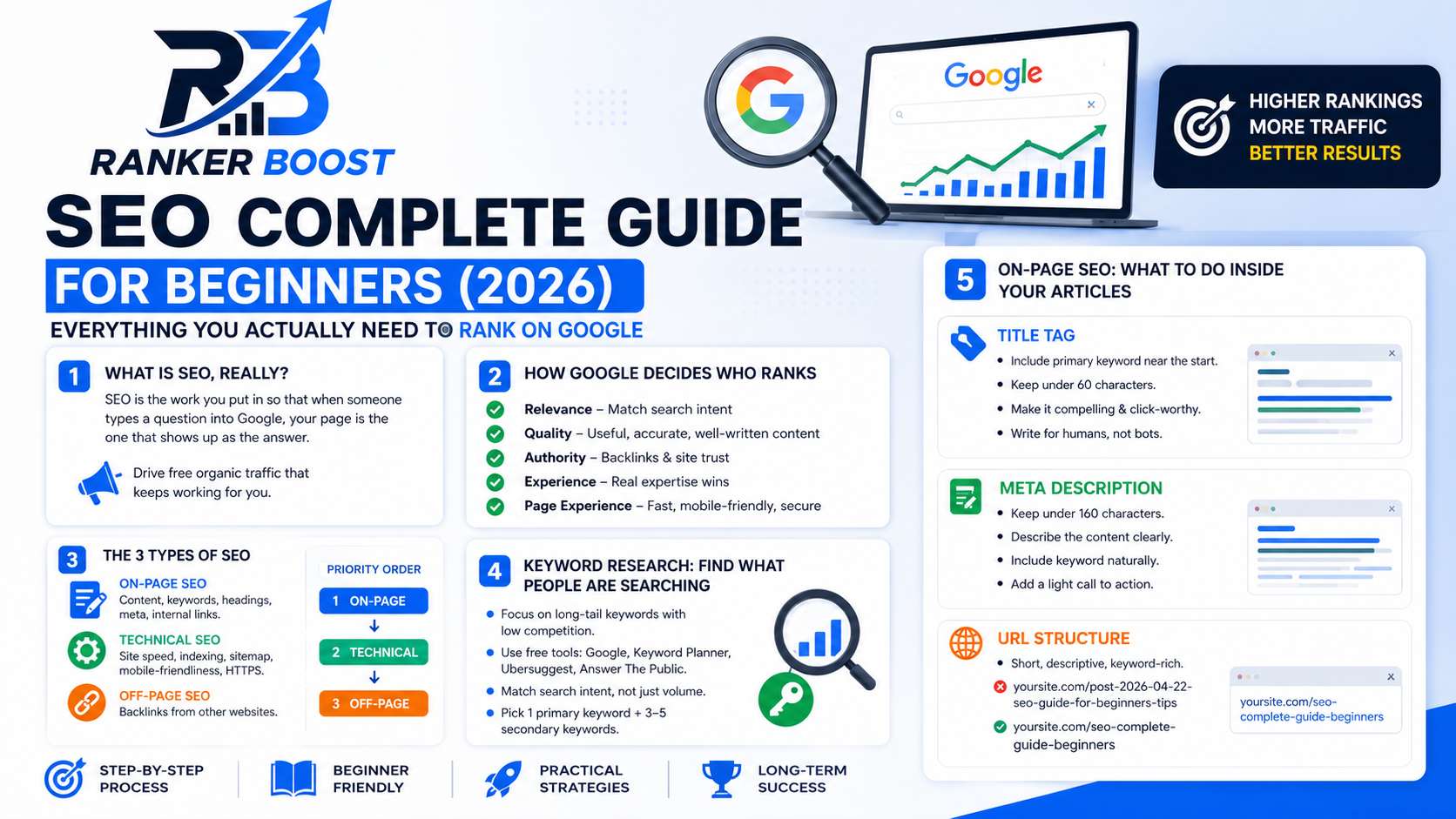
SEO stands for Search Engine Optimization. Knowing that acronym, though, won’t actually help you do anything.
Here’s a more useful way to picture it. SEO is the work you put in so that when someone types a question into Google, your page is the one that shows up as the answer. That’s really the whole idea hiding behind all the jargon.
Every tactic, every tool, every strategy you’ll read about eventually traces back to that single goal: being the most helpful, most relevant, most trustworthy result for a specific search. Google’s entire job is matching people with the best possible answer to whatever they typed. Yours, as someone doing SEO, is making sure your content actually is that answer, and that Google can tell.
Why bother with any of this? Because organic traffic is free. Once a page ranks, you can pull in thousands of visitors a month without spending a rupee on ads, and a good article keeps doing that for years, not just the week you hit publish.
2. How Google Actually Decides Who Ranks
Google runs on an algorithm, basically a giant set of rules, to decide which pages get shown first. Nobody outside Google has the exact formula memorized, but years of testing and Google’s own documentation have made the major factors pretty clear.
First, there’s relevance. Does your page actually answer what was searched? Someone typing “how to fix a leaky faucet” isn’t going to land on your bathroom-design article no matter how clean your SEO is. The match has to be real.
Then quality. Is the content genuinely useful, accurate, well put together? Google has gotten scarily good at spotting thin, repetitive, or misleading pages, so this isn’t a box you can fake your way past anymore.
Authority matters too. Does Google trust the site? That trust gets built from other sites linking to you, a track record over time, and signals that real people find what you’ve written useful.
There’s also experience, which has only gotten more important in 2026. Content written by someone who’s actually lived the topic tends to beat content that just summarized Wikipedia. A personal finance piece from a certified planner is going to outrank a generic rehash, even if the rehash is well-written.
And finally, page experience. Does the site load fast? Is it usable on a phone? Are there pop-ups jumping in your face every five seconds? These technical details move rankings more than most beginners expect.
Learning these five things properly will get you further than memorizing some list of “200 ranking factors” you saw on a forum. Everything else really does flow out from here.
3. The 3 Types of SEO
SEO splits into three broad buckets. Most beginners hear about all three on day one and try to tackle them simultaneously, which usually just leaves them spread thin and overwhelmed. Here’s how I’d actually prioritize.
On-Page SEO
Everything you directly control inside your own pages lives here: keywords, headings, meta descriptions, internal links, image alt text, and just the general quality of your writing.
This is where a beginner should be spending the bulk of their energy, honestly. It’s fully in your hands, it moves the needle the most early on, and you can act on it today without spending a single rupee.
Technical SEO
This is the backend layer — site speed, whether Google can crawl and index your pages properly, your sitemap, URL structure, mobile-friendliness, HTTPS.
It matters, no question, but if you’re running WordPress with a decent theme, most of the basics are already handled for you. Treat this as the thing you tighten up once your on-page work is solid, not the thing you obsess over from day one.
Off-Page SEO
This is what happens outside your website, and it’s mostly about backlinks: other sites linking to yours.
Backlinks are one of Google’s strongest signals, full stop. But the honest truth is you can’t manufacture them quickly as a beginner. The real strategy is writing something good enough that people want to link to it on their own, plus guest posting where it makes sense in your niche.
Priority order for beginners: On-Page → Technical → Off-Page.
4. Keyword Research: How to Find What People Are Searching
Keyword research means finding the exact words and phrases your audience types into Google, then building content around those terms instead of guessing.
Nail this and everything downstream gets easier. Miss it and you can write a genuinely brilliant article that nobody ever stumbles across.
How to Think About Keywords
Every keyword carries two important properties worth understanding.
Search volume tells you how many people search the term each month. Higher volume means more potential traffic, but it usually drags more competition along with it.
Keyword difficulty tells you how hard it’ll be to actually rank, which mostly comes down to how many strong sites are already chasing that same term.
As a new site, what you want is decent volume paired with low competition — what people call long-tail keywords. They’re more specific, less fought-over, and far more realistic to rank for.
Take “SEO” as an example. Over a million searches a month, and basically impossible for a new site to touch. Narrow it to “SEO tips for beginners” and the competition becomes manageable. Narrow further to “SEO tips for beginners with WordPress” and now you’re looking at something genuinely low-competition and rankable.
Free Tools for Keyword Research
Google itself is the most underrated tool here. Type a keyword and watch what autocomplete suggests — those are real searches real people are making. Scroll down and check “People also ask” and “Related searches” too. Completely free, and genuinely useful.
Google Keyword Planner comes free with a Google account and pulls search volume and competition data straight from Google’s own numbers.
Ubersuggest, Neil Patel’s tool, has a free tier that gives keyword ideas along with volume estimates and difficulty scores — solid for someone just starting out.
Answer The Public surfaces the actual questions people ask around a topic, which makes it excellent for long-tail ideas and FAQ content.
A Simple Keyword Research Process
Start with a broad topic, say “email marketing.” Type it into Google and note what autocomplete throws back at you. Head to Keyword Planner and drop in five to ten related terms. Filter down to anything with low-to-medium difficulty. Pick one primary keyword for your article and three to five secondary ones to support it. Then make sure that primary keyword shows up in your title, your first paragraph, and at least one subheading.
One thing worth remembering: search intent beats volume almost every time. Before you commit to any keyword, search it yourself and actually look at what’s ranking. Google is telling you, directly, what kind of content it wants to show for that term. Match it.
5. On-Page SEO: What to Do Inside Your Articles
This is the hands-on part, the stuff you actually do when you sit down to write and hit publish.
Title Tag
Your title tag is the blue, clickable headline showing up in search results, and it’s one of the strongest signals you have direct control over.
A few rules worth following: get your primary keyword in there, ideally near the front. Stay under 60 characters or Google will cut the rest off. Make it compelling enough that a real person actually wants to click it. And don’t cram in three keywords at once — write for the human reading it first.
A bad version might look like “SEO SEO Guide SEO Beginners 2026.” A better one reads more like “SEO Complete Guide for Beginners (2026) — Step-by-Step.”
Meta Description
This is the short blurb under your title in the results. Google doesn’t actually count it as a ranking factor, but it has a huge influence on whether people bother clicking through.
Keep it under 160 characters, describe what the reader actually gets, weave your keyword in naturally, and close with a light call to action if it fits without feeling forced.
URL Structure
Short, descriptive, keyword-rich. That’s the whole rule.
yoursite.com/post-2026-04-22-seo-guide-for-beginners-tips is a mess. yoursite.com/seo-complete-guide-beginners does the job in a fraction of the characters.
Headings (H1, H2, H3)
Your H1 is the main title of the page. Use it exactly once, and put your primary keyword in it.
H2s mark your major sections, H3s break those sections down further when needed. Headings aren’t decoration — they’re how both Google and your readers understand the structure of what you’ve written. Use them to organize, not just to look formatted.
Keyword Placement
Get your primary keyword into the first 100 words, into at least one H2, into your image alt text, and naturally scattered through the body without it feeling forced. If your content genuinely covers the topic well, the placement basically takes care of itself.
Internal Linking
Internal links connect one page on your site to another. They help Google discover your content, understand how pages relate to each other, and spread ranking authority across your whole site instead of pooling it in one place.
Every new article should link to at least two or three other relevant pieces on your site. And every time you publish something new, go back and update a few older articles to link to it too.
This one is genuinely underrated. It costs nothing, takes five minutes, and people skip it constantly.
Image Optimization
Every image needs alt text, a short description of what it actually shows. This helps Google understand the image and makes your site more accessible at the same time.
Compress your images before uploading too — large files slow your page down, and slow pages hurt both the reader’s experience and your rankings. TinyPNG and ShortPixel both have free tiers that compress without any visible quality loss.
Content Length and Depth
There’s no magic word count that makes Google happy. Longer, more thorough pieces tend to rank better, but that’s a side effect of depth, not a target to hit on its own.
The real question is whether your article answers every question a reader might reasonably have about the topic. If yes, you’re in decent shape regardless of word count.
Before you write, search your target keyword and actually read the top three to five results. Note what they cover. Then write something that covers all of it and adds something they’re missing — a personal experience, a case study, a sharper explanation, an angle nobody else bothered with.
6. Technical SEO: The Foundation Nobody Talks About
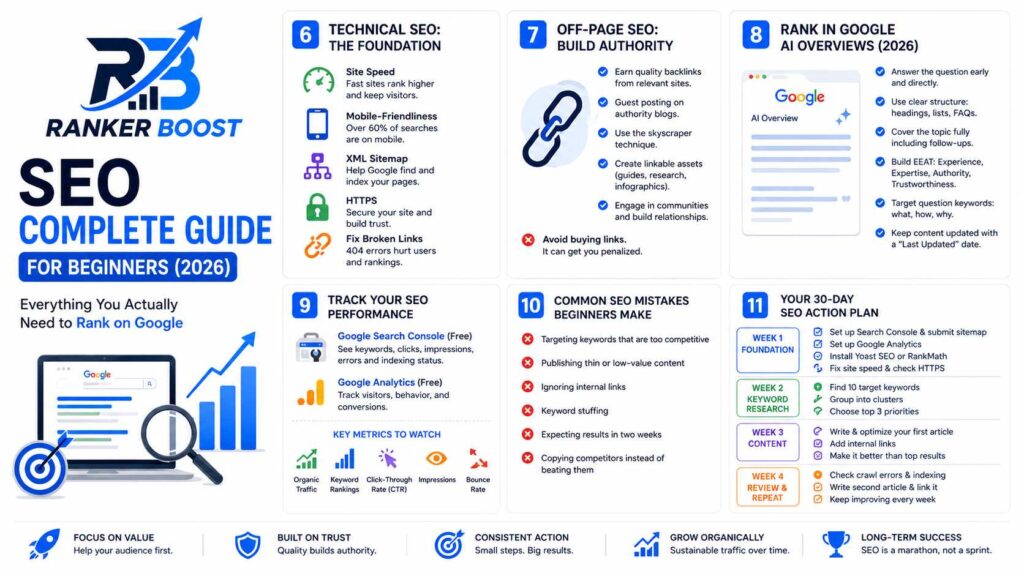
You can write fantastic content and nail every on-page detail, but if the technical foundation underneath is broken, Google might struggle to even find your pages in the first place. Here’s what actually matters.
Site Speed
Page speed is a ranking factor, and it’s only grown more important with time. It also just loses you visitors directly — most people abandon a page that takes more than three seconds to load, full stop.
Run your site through Google PageSpeed Insights (free) and it’ll hand you a score plus specific fixes. Quick wins worth chasing: compress your images, install a caching plugin like W3 Total Cache or LiteSpeed Cache, pick decent hosting, and use a lightweight theme such as Astra or GeneratePress.
Mobile-Friendliness
More than 60% of searches now happen on mobile, and Google’s mobile-first indexing means your mobile version is usually what gets judged for ranking purposes, not your desktop one.
Run Google’s Mobile-Friendly Test, and if anything fails, fix it. This one really isn’t optional anymore.
XML Sitemap
A sitemap lists out all your pages so Google knows where to find them. Yoast SEO or RankMath will generate one automatically in WordPress. Submit it to Google Search Console so Google actually has it on file.
HTTPS
If your URL still starts with http:// instead of https://, you need an SSL certificate, and most hosts throw that in free these days. Google treats HTTPS as a ranking signal, and browsers slap security warnings on non-HTTPS sites, which kills trust instantly.
Fix Broken Links
404 errors hurt both the reader and your rankings. A free tool like Broken Link Checker will surface them; fix or redirect what you find.
7. Off-Page SEO: How to Build Authority
Off-page SEO mostly comes down to backlinks, links from other sites pointing back at yours. Think of each one as a small vote of confidence. Stack enough quality votes and Google’s trust in your site climbs with it.
Quality is the operative word there. One link from a respected site in your niche outweighs a hundred from random, low-grade ones.
So how do you actually build links as a beginner? Guest posting is probably the most reliable route — write for another blog in your space, and you typically get a link back in your bio or somewhere in the body. The skyscraper technique works too: find a popular article, write something meaningfully better, then reach out to sites linking to the original and point them toward yours.
Creating genuinely linkable assets, like original research, infographics, or thorough guides, takes more upfront effort but tends to pay off for a long time, since people reference them naturally. Showing up consistently in your niche’s community, commenting, posting, being visible, also helps; once people know your name and respect what you know, links start following on their own.
One thing to avoid entirely: buying links. It’s against Google’s guidelines, it can get your site penalized, and it just isn’t worth the gamble.
8. How to Rank in Google AI Overviews (2026)
Two years ago this section wouldn’t have existed in any SEO guide. Now it’s essential.
Google AI Overviews, what used to be called SGE, are the AI-generated summaries sitting at the top of results for many queries. They pull from multiple sources and stitch together a direct answer. Getting cited in one can send a real amount of traffic your way, and it’s also a signal that Google sees your content as authoritative.
A few things help here. Answer the actual question early and directly, instead of burying it under a 2,000-word windup; AI Overviews favor content that gets to the point fast and then backs it up. Structure things clearly, with numbered lists, real headings, and FAQ sections, since that makes it far easier for Google’s AI to lift and cite your content. Cover the topic fully too, including the obvious follow-up questions, because comprehensive sources get cited more often than narrow ones.
Building real EEAT signals matters as well: experience, expertise, authoritativeness, trustworthiness. An author bio, links to credible sources, writing that clearly comes from lived experience rather than a summary of other summaries. Targeting question-style keywords like “what is,” “how to,” or “why does” tends to trigger Overviews more often, so structure your content to answer those directly. And keep things current. AI Overviews lean toward fresh information, so a visible “Last Updated” date plus actually refreshing old content when things change goes a long way.
9. How to Track Whether Your SEO Is Working
SEO is slow by nature, usually three to six months before you see anything meaningful. But you should still be tracking from day one, because that’s the only way you’ll know what’s actually working.
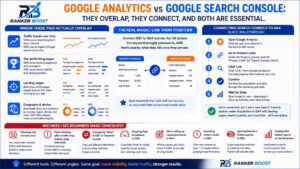
Google Search Console (Free — Use This First)
If you only set up one tool, make it this one. Connect your site and you’ll see which keywords are bringing people in, your impressions and clicks, which pages are ranking and where, any technical errors Google has flagged, and whether your pages are even getting indexed.
If you haven’t done this yet, do it today. Ten minutes, completely free, and it hands you data you genuinely can’t get anywhere else.
Google Analytics (Free)
Where Search Console shows you the search side, Analytics shows what happens after someone actually lands on your page: how many visitors, how long they stick around, what they read, whether they take any action at all. Together, the two give you the full picture.
Key Metrics to Watch
Organic traffic is the headline number, how many visitors are arriving through Google search. Keyword rankings matter too; even climbing from position 15 to position 8 is real progress worth noting. Click-through rate tells you what share of people who see your result actually click it, and a low number usually means your title or description needs work. Impressions show how often you’re appearing at all, and rising impressions alongside a steady or improving rank is a good sign. Bounce rate flags whether people are leaving immediately, which can mean your content isn’t matching what they expected.
A simple habit worth building: once a month, check your top ten pages, your top ten keywords, and note what’s climbing or slipping. Let that guide what you write or update next.
10. Common SEO Mistakes Beginners Make
These are the mistakes I see again and again from people just getting started.
Going after keywords that are too competitive. A brand-new site cannot beat established domains for broad, high-volume terms. “Digital marketing” isn’t your keyword. “Digital marketing tips for freelancers in 2026” might genuinely be. Start narrow, build some authority, expand from there.
Publishing thin content. A 400-word explanation of “what is SEO” doesn’t help anyone who can already find the same thing explained better in fifty other places. Whatever you publish should be the most useful, complete resource on that exact topic that you’re capable of producing. If you’re not willing to go that far, hold off on publishing it.
Ignoring internal links. I’ve seen sites with over a hundred articles where almost none link to each other. That’s a genuinely huge missed opportunity, and it costs nothing to fix.
Keyword stuffing. This worked in 2005. Today it actively hurts you. Write naturally, use the keyword where it actually fits, and trust that Google’s algorithms understand context well enough that you don’t need to repeat a phrase fifteen times in a thousand words.
Expecting results in two weeks. SEO is a long game. Quality content published consistently, a solid technical foundation, steady link-building, and you should start seeing real movement in three to six months. Not two weeks. Set expectations accordingly and don’t quit early.
Copying competitors instead of beating them. Reading their stuff for ideas is smart. Rewriting it without adding anything new isn’t. Google can tell the difference between derivative content and content that genuinely adds value, and it rewards the latter.
11. Your 30-Day SEO Action Plan
Here’s exactly what to do over your first 30 days. No theory, just the tasks.
Week 1 — Foundation Set up Google Search Console and submit your sitemap. Set up Google Analytics. Install Yoast SEO or RankMath. Run PageSpeed Insights and fix the easy wins. Confirm your site is on HTTPS.
Week 2 — Keyword Research Pick ten target keywords using Keyword Planner and Ubersuggest. Lean long-tail, low competition. Group related ones into clusters. Settle on your top three priorities based on relevance and difficulty.
Week 3 — Content Write your first fully optimized article around your top keyword. Nail the title tag, meta description, headings, and alt text. Add internal links to two or three existing pages. Make sure the piece genuinely beats the current top-ranking results on search intent.
Week 4 — Review and Repeat Check Search Console for crawl errors. Confirm your new article got indexed (search site:yoursite.com/your-article-url to check). Write your second optimized article, and link your first piece to it.
After that, keep the rhythm going. One well-optimized article a week, a monthly look at your data, and adjustments based on what you actually see happening.
F.A.Q
Realistically, three to six months before a new site sees meaningful organic traffic, assuming you’re publishing consistently and getting the on-page basics right. Some pieces rank faster, some slower. Consistency is the real lever.
Yes, without question. Organic search still drives most of the world’s website traffic. AI Overviews have changed how results get displayed, sure, but they haven’t removed the need for genuinely good content — if anything, they’ve raised the bar.
Not at the start. Search Console, Analytics, Keyword Planner, Ubersuggest’s free tier, and Answer The Public will carry you a long way. Paid tools like Ahrefs or SEMrush make sense once you’re more serious and have budget to spend, not before.
SEO is about earning free, organic traffic from search engines. SEM covers paid advertising, like Google Ads, to show up in results. SEO takes longer to pay off but keeps working without ongoing spend. SEM works fast but stops the moment you stop paying.
There’s no fixed number. One excellent article can rank and pull in steady traffic on its own. A hundred thin, unhelpful ones will rank for nothing. Quality wins over quantity, though consistency still counts, one solid article a week builds authority faster than a burst of ten in January followed by silence.
It stands for Experience, Expertise, Authoritativeness, and Trustworthiness, and Google leans on these especially hard for topics touching health, money, or safety. An author bio, credible sources, writing rooted in real experience, a reputation built over time, none of these are quick fixes. They’re long-term investments that compound.
You can absolutely do it yourself. None of the fundamentals are technically complicated; they just require time, consistency, and decent judgment. Plenty of successful blogs are run by one person handling their own SEO. Once you’ve grown and have budget, bringing in specialists for link building or technical audits makes sense, but starting solo is both realistic and the fastest way to actually learn.
Don’t panic first. Check Search Console for manual penalties or coverage issues. Look up whether Google rolled out a major algorithm update around when the drop happened. Compare the articles that fell against whatever’s currently ranking in their place, and ask honestly whether your content is still the best answer out there. Often a drop is just a nudge to update and improve, not a reason to give up on SEO altogether.
Final Word
SEO in 2026 isn’t complicated, but it does demand patience and consistency.
The fundamentals haven’t really changed: create content that genuinely helps people, make sure Google can find and understand it, and build authority over time. What’s shifted is how high the bar sits now. Generic, surface-level content simply doesn’t rank the way it used to. Content with real depth, real experience, and real value still does, and arguably does even better than before.
Start with the 30-day plan above. Build the habit of one optimized article a week. Check your Search Console numbers monthly. And don’t walk away before the six-month mark, because that’s usually right when things start to move.
Good luck out there.
Written by Saksham Verma | Ranker Boost — SEO, Blogging & Digital Marketing for Beginners
Google Search Console complete Guide in 2026 :- Learn More